US7391963B2 - Method of controlling multimedia audio and video playback - Google Patents
Method of controlling multimedia audio and video playback Download PDFInfo
- Publication number
- US7391963B2 US7391963B2 US10/671,462 US67146203A US7391963B2 US 7391963 B2 US7391963 B2 US 7391963B2 US 67146203 A US67146203 A US 67146203A US 7391963 B2 US7391963 B2 US 7391963B2
- Authority
- US
- United States
- Prior art keywords
- playback
- audio
- video playback
- setup
- program
- Prior art date
- Legal status (The legal status is an assumption and is not a legal conclusion. Google has not performed a legal analysis and makes no representation as to the accuracy of the status listed.)
- Expired - Fee Related, expires
Links
Images



Classifications
-
- H—ELECTRICITY
- H04—ELECTRIC COMMUNICATION TECHNIQUE
- H04N—PICTORIAL COMMUNICATION, e.g. TELEVISION
- H04N21/00—Selective content distribution, e.g. interactive television or video on demand [VOD]
- H04N21/40—Client devices specifically adapted for the reception of or interaction with content, e.g. set-top-box [STB]; Operations thereof
- H04N21/43—Processing of content or additional data, e.g. demultiplexing additional data from a digital video stream; Elementary client operations, e.g. monitoring of home network or synchronising decoder's clock; Client middleware
- H04N21/433—Content storage operation, e.g. storage operation in response to a pause request, caching operations
-
- H—ELECTRICITY
- H04—ELECTRIC COMMUNICATION TECHNIQUE
- H04N—PICTORIAL COMMUNICATION, e.g. TELEVISION
- H04N21/00—Selective content distribution, e.g. interactive television or video on demand [VOD]
- H04N21/40—Client devices specifically adapted for the reception of or interaction with content, e.g. set-top-box [STB]; Operations thereof
- H04N21/43—Processing of content or additional data, e.g. demultiplexing additional data from a digital video stream; Elementary client operations, e.g. monitoring of home network or synchronising decoder's clock; Client middleware
- H04N21/431—Generation of visual interfaces for content selection or interaction; Content or additional data rendering
- H04N21/4312—Generation of visual interfaces for content selection or interaction; Content or additional data rendering involving specific graphical features, e.g. screen layout, special fonts or colors, blinking icons, highlights or animations
-
- H—ELECTRICITY
- H04—ELECTRIC COMMUNICATION TECHNIQUE
- H04N—PICTORIAL COMMUNICATION, e.g. TELEVISION
- H04N21/00—Selective content distribution, e.g. interactive television or video on demand [VOD]
- H04N21/40—Client devices specifically adapted for the reception of or interaction with content, e.g. set-top-box [STB]; Operations thereof
- H04N21/43—Processing of content or additional data, e.g. demultiplexing additional data from a digital video stream; Elementary client operations, e.g. monitoring of home network or synchronising decoder's clock; Client middleware
- H04N21/431—Generation of visual interfaces for content selection or interaction; Content or additional data rendering
- H04N21/4312—Generation of visual interfaces for content selection or interaction; Content or additional data rendering involving specific graphical features, e.g. screen layout, special fonts or colors, blinking icons, highlights or animations
- H04N21/4314—Generation of visual interfaces for content selection or interaction; Content or additional data rendering involving specific graphical features, e.g. screen layout, special fonts or colors, blinking icons, highlights or animations for fitting data in a restricted space on the screen, e.g. EPG data in a rectangular grid
-
- H—ELECTRICITY
- H04—ELECTRIC COMMUNICATION TECHNIQUE
- H04N—PICTORIAL COMMUNICATION, e.g. TELEVISION
- H04N21/00—Selective content distribution, e.g. interactive television or video on demand [VOD]
- H04N21/40—Client devices specifically adapted for the reception of or interaction with content, e.g. set-top-box [STB]; Operations thereof
- H04N21/43—Processing of content or additional data, e.g. demultiplexing additional data from a digital video stream; Elementary client operations, e.g. monitoring of home network or synchronising decoder's clock; Client middleware
- H04N21/432—Content retrieval operation from a local storage medium, e.g. hard-disk
- H04N21/4325—Content retrieval operation from a local storage medium, e.g. hard-disk by playing back content from the storage medium
-
- H—ELECTRICITY
- H04—ELECTRIC COMMUNICATION TECHNIQUE
- H04N—PICTORIAL COMMUNICATION, e.g. TELEVISION
- H04N21/00—Selective content distribution, e.g. interactive television or video on demand [VOD]
- H04N21/40—Client devices specifically adapted for the reception of or interaction with content, e.g. set-top-box [STB]; Operations thereof
- H04N21/43—Processing of content or additional data, e.g. demultiplexing additional data from a digital video stream; Elementary client operations, e.g. monitoring of home network or synchronising decoder's clock; Client middleware
- H04N21/443—OS processes, e.g. booting an STB, implementing a Java virtual machine in an STB or power management in an STB
- H04N21/4432—Powering on the client, e.g. bootstrap loading using setup parameters being stored locally or received from the server
-
- H—ELECTRICITY
- H04—ELECTRIC COMMUNICATION TECHNIQUE
- H04N—PICTORIAL COMMUNICATION, e.g. TELEVISION
- H04N21/00—Selective content distribution, e.g. interactive television or video on demand [VOD]
- H04N21/40—Client devices specifically adapted for the reception of or interaction with content, e.g. set-top-box [STB]; Operations thereof
- H04N21/47—End-user applications
- H04N21/485—End-user interface for client configuration
-
- H—ELECTRICITY
- H04—ELECTRIC COMMUNICATION TECHNIQUE
- H04N—PICTORIAL COMMUNICATION, e.g. TELEVISION
- H04N5/00—Details of television systems
- H04N5/76—Television signal recording
- H04N5/84—Television signal recording using optical recording
- H04N5/85—Television signal recording using optical recording on discs or drums
Definitions
- the present invention relates to a method of controlling the multimedia audio and video playback.
- Such playback program has a plurality of playback setup options (such as volume, language, screen, and caption, etc.), so that users may freely adjust the setup values (such as the volume, sound quality, screen size, image brightness, and external screen, etc) for the playback options according to personal preferences.
- the primary objective of the present invention is to provide a method of controlling the multimedia audio and video playback.
- a computer device such as a notebook computer
- the user just needs to run an audio/video playback program (such as Win DVD or Media Player) without further setting or adjusting the setup value every time, and such audio/video playback program will follow the user's preset setup to play the movie.
- the main technology resides on that such computer device has a playback control program and a data storage medium, wherein after the audio/video playback program has started, it makes adjustment to each of the setup values (such as the volume, sound quality, screen size, image brightness, and external screen, etc) for the playback, and saves the setup data into the data storage medium.
- Such playback control program will automatically load the setup values for the playback options if the program detects the execution of such audio/video playback function.
- the audio/video playback function will play the multimedia file according to the content of the setup values.
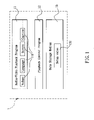
- FIG. 1 is an illustrative diagram of the present invention.
- FIG. 2 is a flow chart of the present invention.
- FIG. 3 is another illustrative diagram of the present invention.
- This invention discloses a method of controlling the multimedia audio and video playback.
- a computer device having an audio/video playback program 11 (such as Win DVD or Media Player), a playback control program 12 and a data storage medium 13 , wherein after the audio/video playback program 11 is run, each of the playback setup option 111 (such as volume, language, screen, and caption, etc.) performs an adjustment and saves the adjusted setup values 131 (such as the volume, sound quality, screen size, image brightness, and external screen, etc) into the data storage medium 13 .
- an audio/video playback program 11 such as Win DVD or Media Player
- a playback control program 12 and a data storage medium 13
- each of the playback setup option 111 such as volume, language, screen, and caption, etc.
- the adjusted setup values 131 such as the volume, sound quality, screen size, image brightness, and external screen, etc
- the playback control program 12 will process and determine according to the following procedure if it has detected the execution of the audio/video playback program 11 :
- the computer device 1 could be a notebook computer or a desktop computer;
- the data storage medium 13 could be a hard disk or a memory;
- the multimedia file could be stored in a CD, a floppy disk, or a movie or a song stored in the data storage medium 13 .
- the playback control program 12 will detect the execution of the audio/video playback program 11 , and automatically load the setup values 131 from the memory or hard disk of the notebook computer, such that the audio/video playback program 11 will play on a display screen 2 of the notebook computer according to the contents of the setup values 131 . Therefore, User A no longer needs to adjust or set the playback setup options 111 . After User A has opened the audio/video playback program 11 , User A can start watching the spectacular content of the horror film.
- setup groups 132 of different natures when the setup value 131 of each of these playback setup options 111 are adjusted and saved into the data storage medium 13 .
- the data storage medium 13 stores a plurality of setup groups 132 of different natures.
- the dialog box 21 comprises a plurality of playback environment options 211 (such as Horror Movie Option, Comedy Movie Option, Classic Music Option, and Rock and Roll Music Option, etc”; so that after User B has selected an appropriate playback environment option 211 (for example, the Comedy Movie Option), the playback control program 12 will download the setup group 132 corresponding to such playback environment option 211 from the data storage medium 13 .
- the audio/video playback program 11 can play the movie according to the content of the setup group 132 , so that User B can view the comedy movie with the corresponding audio/video effect.
Abstract
Description
- (101) Determining whether or not there is a multimedia file waiting to be executed; if yes, go to next step, or else repeat Step (101);
- (102) Loading the
setup values 131 from thedata storage medium 13 for theplayback setup options 111; - (103) Letting the audio/
video playback program 11 execute the multimedia file according to the content of thesetup values 131.
Claims (7)
Priority Applications (1)
| Application Number | Priority Date | Filing Date | Title |
|---|---|---|---|
| US10/671,462 US7391963B2 (en) | 2003-09-29 | 2003-09-29 | Method of controlling multimedia audio and video playback |
Applications Claiming Priority (1)
| Application Number | Priority Date | Filing Date | Title |
|---|---|---|---|
| US10/671,462 US7391963B2 (en) | 2003-09-29 | 2003-09-29 | Method of controlling multimedia audio and video playback |
Publications (2)
| Publication Number | Publication Date |
|---|---|
| US20050069280A1 US20050069280A1 (en) | 2005-03-31 |
| US7391963B2 true US7391963B2 (en) | 2008-06-24 |
Family
ID=34376143
Family Applications (1)
| Application Number | Title | Priority Date | Filing Date |
|---|---|---|---|
| US10/671,462 Expired - Fee Related US7391963B2 (en) | 2003-09-29 | 2003-09-29 | Method of controlling multimedia audio and video playback |
Country Status (1)
| Country | Link |
|---|---|
| US (1) | US7391963B2 (en) |
Cited By (12)
| Publication number | Priority date | Publication date | Assignee | Title |
|---|---|---|---|---|
| US20070234420A1 (en) * | 2004-04-27 | 2007-10-04 | Novotney Donald J | Method and system for authenticating an accessory |
| US20090013253A1 (en) * | 2006-09-11 | 2009-01-08 | Apple Inc. | Method and system for controlling video selection and playback in a portable media player |
| US20090083834A1 (en) * | 2005-01-07 | 2009-03-26 | Apple Inc. | Accessory authentication for electronic devices |
| US20090299506A1 (en) * | 2004-04-27 | 2009-12-03 | Apple Inc. | Method and system for transferring status information between a media player and an accessory |
| US20100049350A1 (en) * | 2006-05-22 | 2010-02-25 | Apple Inc. | Method and system for transferring stored data between a media player and an accessory |
| US8082376B2 (en) | 2004-04-27 | 2011-12-20 | Apple Inc. | Communication between an accessory and a media player with multiple protocol versions |
| US8095716B2 (en) | 2006-06-27 | 2012-01-10 | Apple Inc. | Method and system for communicating capability information from an accessory to a media player |
| US8099536B2 (en) | 2004-04-27 | 2012-01-17 | Apple Inc. | Communication between an accessory and a media player with general and accessory lingoes |
| US8112567B2 (en) | 2006-09-11 | 2012-02-07 | Apple, Inc. | Method and system for controlling power provided to an accessory |
| US8171195B2 (en) | 2004-04-27 | 2012-05-01 | Apple Inc. | Media player communication with an accessory using a display remote lingo |
| US8208853B2 (en) | 2008-09-08 | 2012-06-26 | Apple Inc. | Accessory device authentication |
| US8238811B2 (en) | 2008-09-08 | 2012-08-07 | Apple Inc. | Cross-transport authentication |
Families Citing this family (9)
| Publication number | Priority date | Publication date | Assignee | Title |
|---|---|---|---|---|
| JP2005122839A (en) * | 2003-10-17 | 2005-05-12 | Pioneer Electronic Corp | Information reproducing device, information reproducing method and the like |
| TWI423041B (en) * | 2007-07-09 | 2014-01-11 | Cyberlink Corp | Av playing method capable of improving multimedia interactive mechanism and related apparatus |
| JP2009049808A (en) * | 2007-08-21 | 2009-03-05 | Funai Electric Co Ltd | Image processor |
| EP2497280A2 (en) * | 2009-11-06 | 2012-09-12 | TP Vision Holding B.V. | A method and apparatus for rendering a multimedia item with a plurality of modalities |
| KR101632221B1 (en) * | 2014-02-27 | 2016-07-01 | 엘지전자 주식회사 | Digital device and method for processing service thereof |
| JP6733730B2 (en) * | 2016-05-25 | 2020-08-05 | ヤマハ株式会社 | Content reproduction apparatus and content reproduction method |
| CN110489571A (en) * | 2019-08-14 | 2019-11-22 | Oppo(重庆)智能科技有限公司 | Audio-frequency processing method and device, electronic equipment, computer readable storage medium |
| CN114554266A (en) * | 2020-11-25 | 2022-05-27 | 海信视像科技股份有限公司 | Display apparatus and display method |
| CN114554291A (en) * | 2022-02-17 | 2022-05-27 | 上海幻维数码创意科技股份有限公司 | Multi-video playing control method based on unity plug-in |
Citations (21)
| Publication number | Priority date | Publication date | Assignee | Title |
|---|---|---|---|---|
| US4899326A (en) * | 1986-10-15 | 1990-02-06 | Pioneer Electronic Corporation | Magazine-housed disk player |
| US4962494A (en) * | 1986-05-15 | 1990-10-09 | Yamaha Corporation | Optical disk playback device having automatic volume control |
| US5113383A (en) * | 1989-02-13 | 1992-05-12 | Pioneer Electronic Corporation | Information reproducing system and method |
| US5274816A (en) * | 1990-11-02 | 1993-12-28 | Kabushiki Kaisha Toshiba | Personal computer capable of changing boot priority |
| US5581785A (en) * | 1993-07-27 | 1996-12-03 | Fuji Electric Co., Ltd. | Starting system of disk storage device and data reading/writing system of the same |
| US5761406A (en) * | 1992-07-31 | 1998-06-02 | Fujitsu Limited | Method of controlling data transfer and a safe shutdown in a hierarchical cache system during power cut-off |
| US5825649A (en) * | 1994-05-19 | 1998-10-20 | Kabushiki Kaisha Toshiba | Kernel substitution method in multi-processor system and multi-processor system having kernel substitution function |
| US5862107A (en) * | 1994-07-27 | 1999-01-19 | Kabushiki Kaisha Kenwood | Disc player capable of automatically interchanging a plurality of loaded discs |
| US5892952A (en) * | 1993-09-30 | 1999-04-06 | Fujitsu Limited | Operating system renewing apparatus and method for installing new operating system in computer system |
| US6128434A (en) * | 1993-10-29 | 2000-10-03 | Kabushiki Kaisha Toshiba | Multilingual recording medium and reproduction apparatus |
| US20010002223A1 (en) * | 1997-06-12 | 2001-05-31 | Kenichi Watanabe | Disc playback device and media storing a playback control program for the same |
| US6288991B1 (en) * | 1995-03-06 | 2001-09-11 | Fujitsu Limited | Storage medium playback method and device |
| US20010040842A1 (en) * | 1997-06-19 | 2001-11-15 | Sony Corporation | Reproduction apparatus and method of displaying data in selected language |
| US20020072818A1 (en) * | 1997-11-24 | 2002-06-13 | Moon Kwang-Su | MPEG portable sound reproducing system and a reproducing method thereof |
| US20030039472A1 (en) * | 2001-08-25 | 2003-02-27 | Kim Doo-Nam | Method of and apparatus for selecting subtitles from an optical recording medium |
| US20030086681A1 (en) * | 2001-11-06 | 2003-05-08 | Funai Electric Co., Ltd. | Digital versatile disk player |
| US6681325B1 (en) * | 1999-09-15 | 2004-01-20 | Powerquest Corporation | Providing disk layout information to an operating system for booting after disk repartitioning |
| US20040042763A1 (en) * | 2002-08-30 | 2004-03-04 | Pioneer Corporation | Information reproducing apparatus and method |
| US20040120228A1 (en) * | 2002-09-13 | 2004-06-24 | Han Gyoo Min | Play control method in digital versatile disc player |
| US6965727B1 (en) * | 1998-04-10 | 2005-11-15 | Pioneer Electronic Corporation | Information record medium and apparatus for reproducing the same |
| US7085477B2 (en) * | 2000-10-27 | 2006-08-01 | Funai Electric Co., Ltd. | Television apparatus |
-
2003
- 2003-09-29 US US10/671,462 patent/US7391963B2/en not_active Expired - Fee Related
Patent Citations (23)
| Publication number | Priority date | Publication date | Assignee | Title |
|---|---|---|---|---|
| US4962494A (en) * | 1986-05-15 | 1990-10-09 | Yamaha Corporation | Optical disk playback device having automatic volume control |
| US4899326A (en) * | 1986-10-15 | 1990-02-06 | Pioneer Electronic Corporation | Magazine-housed disk player |
| US5113383A (en) * | 1989-02-13 | 1992-05-12 | Pioneer Electronic Corporation | Information reproducing system and method |
| US5274816A (en) * | 1990-11-02 | 1993-12-28 | Kabushiki Kaisha Toshiba | Personal computer capable of changing boot priority |
| US5448741A (en) * | 1990-11-02 | 1995-09-05 | Kabushiki Kaisha Toshiba | Personal computer capable of changing boot priority |
| US5761406A (en) * | 1992-07-31 | 1998-06-02 | Fujitsu Limited | Method of controlling data transfer and a safe shutdown in a hierarchical cache system during power cut-off |
| US5581785A (en) * | 1993-07-27 | 1996-12-03 | Fuji Electric Co., Ltd. | Starting system of disk storage device and data reading/writing system of the same |
| US5892952A (en) * | 1993-09-30 | 1999-04-06 | Fujitsu Limited | Operating system renewing apparatus and method for installing new operating system in computer system |
| US6128434A (en) * | 1993-10-29 | 2000-10-03 | Kabushiki Kaisha Toshiba | Multilingual recording medium and reproduction apparatus |
| US5825649A (en) * | 1994-05-19 | 1998-10-20 | Kabushiki Kaisha Toshiba | Kernel substitution method in multi-processor system and multi-processor system having kernel substitution function |
| US5862107A (en) * | 1994-07-27 | 1999-01-19 | Kabushiki Kaisha Kenwood | Disc player capable of automatically interchanging a plurality of loaded discs |
| US6288991B1 (en) * | 1995-03-06 | 2001-09-11 | Fujitsu Limited | Storage medium playback method and device |
| US20020031065A1 (en) * | 1995-03-06 | 2002-03-14 | Fujitsu Limited | Automatic storage medium identifying method and device, automatic music CD identifying method and device, storage meduim playback method and device, and storage medium as music CD |
| US20010002223A1 (en) * | 1997-06-12 | 2001-05-31 | Kenichi Watanabe | Disc playback device and media storing a playback control program for the same |
| US20010040842A1 (en) * | 1997-06-19 | 2001-11-15 | Sony Corporation | Reproduction apparatus and method of displaying data in selected language |
| US20020072818A1 (en) * | 1997-11-24 | 2002-06-13 | Moon Kwang-Su | MPEG portable sound reproducing system and a reproducing method thereof |
| US6965727B1 (en) * | 1998-04-10 | 2005-11-15 | Pioneer Electronic Corporation | Information record medium and apparatus for reproducing the same |
| US6681325B1 (en) * | 1999-09-15 | 2004-01-20 | Powerquest Corporation | Providing disk layout information to an operating system for booting after disk repartitioning |
| US7085477B2 (en) * | 2000-10-27 | 2006-08-01 | Funai Electric Co., Ltd. | Television apparatus |
| US20030039472A1 (en) * | 2001-08-25 | 2003-02-27 | Kim Doo-Nam | Method of and apparatus for selecting subtitles from an optical recording medium |
| US20030086681A1 (en) * | 2001-11-06 | 2003-05-08 | Funai Electric Co., Ltd. | Digital versatile disk player |
| US20040042763A1 (en) * | 2002-08-30 | 2004-03-04 | Pioneer Corporation | Information reproducing apparatus and method |
| US20040120228A1 (en) * | 2002-09-13 | 2004-06-24 | Han Gyoo Min | Play control method in digital versatile disc player |
Cited By (32)
| Publication number | Priority date | Publication date | Assignee | Title |
|---|---|---|---|---|
| US8171194B2 (en) | 2004-04-27 | 2012-05-01 | Apple Inc. | Accessory communication with a media player using a display remote lingo |
| US8386680B2 (en) | 2004-04-27 | 2013-02-26 | Apple Inc. | Communication between an accessory and a media player with multiple protocol versions and extended interface lingo |
| US8171195B2 (en) | 2004-04-27 | 2012-05-01 | Apple Inc. | Media player communication with an accessory using a display remote lingo |
| US20090299506A1 (en) * | 2004-04-27 | 2009-12-03 | Apple Inc. | Method and system for transferring status information between a media player and an accessory |
| US8402187B2 (en) | 2004-04-27 | 2013-03-19 | Apple Inc. | Method and system for transferring button status information between a media player and an accessory |
| US8285901B2 (en) | 2004-04-27 | 2012-10-09 | Apple Inc. | Communication between an accessory and a media player using an extended interface lingo |
| US20070234420A1 (en) * | 2004-04-27 | 2007-10-04 | Novotney Donald J | Method and system for authenticating an accessory |
| US8239595B2 (en) | 2004-04-27 | 2012-08-07 | Apple Inc. | Communication between a media player and an accessory with an extended interface mode |
| US8082376B2 (en) | 2004-04-27 | 2011-12-20 | Apple Inc. | Communication between an accessory and a media player with multiple protocol versions |
| US8135891B2 (en) | 2004-04-27 | 2012-03-13 | Apple Inc. | Method and system for transferring button status information between a media player and an accessory |
| US8099536B2 (en) | 2004-04-27 | 2012-01-17 | Apple Inc. | Communication between an accessory and a media player with general and accessory lingoes |
| US8117651B2 (en) | 2004-04-27 | 2012-02-14 | Apple Inc. | Method and system for authenticating an accessory |
| US8763079B2 (en) | 2005-01-07 | 2014-06-24 | Apple Inc. | Accessory authentication for electronic devices |
| US8161567B2 (en) | 2005-01-07 | 2012-04-17 | Apple Inc. | Accessory authentication for electronic devices |
| US9754099B2 (en) | 2005-01-07 | 2017-09-05 | Apple Inc. | Accessory authentication for electronic devices |
| US10049206B2 (en) | 2005-01-07 | 2018-08-14 | Apple Inc. | Accessory authentication for electronic devices |
| US20090083834A1 (en) * | 2005-01-07 | 2009-03-26 | Apple Inc. | Accessory authentication for electronic devices |
| US9223958B2 (en) | 2005-01-07 | 2015-12-29 | Apple Inc. | Accessory authentication for electronic devices |
| US20100049350A1 (en) * | 2006-05-22 | 2010-02-25 | Apple Inc. | Method and system for transferring stored data between a media player and an accessory |
| US8006019B2 (en) | 2006-05-22 | 2011-08-23 | Apple, Inc. | Method and system for transferring stored data between a media player and an accessory |
| US8590036B2 (en) | 2006-06-27 | 2013-11-19 | Apple Inc. | Method and system for authenticating an accessory |
| US8370555B2 (en) | 2006-06-27 | 2013-02-05 | Apple Inc. | Method and system for allowing a media player to determine if it supports the capabilities of an accessory |
| US9160541B2 (en) | 2006-06-27 | 2015-10-13 | Apple Inc. | Method and system for authenticating an accessory |
| US8095716B2 (en) | 2006-06-27 | 2012-01-10 | Apple Inc. | Method and system for communicating capability information from an accessory to a media player |
| US7908415B2 (en) * | 2006-09-11 | 2011-03-15 | Apple Inc. | Method and system for controlling video selection and playback in a portable media player |
| US8112567B2 (en) | 2006-09-11 | 2012-02-07 | Apple, Inc. | Method and system for controlling power provided to an accessory |
| US20090013253A1 (en) * | 2006-09-11 | 2009-01-08 | Apple Inc. | Method and system for controlling video selection and playback in a portable media player |
| US20100106879A1 (en) * | 2006-09-11 | 2010-04-29 | Apple Inc. | Method and system for controlling video selection and playback in a portable media player |
| US8238811B2 (en) | 2008-09-08 | 2012-08-07 | Apple Inc. | Cross-transport authentication |
| US8208853B2 (en) | 2008-09-08 | 2012-06-26 | Apple Inc. | Accessory device authentication |
| US8509691B2 (en) | 2008-09-08 | 2013-08-13 | Apple Inc. | Accessory device authentication |
| US8634761B2 (en) | 2008-09-08 | 2014-01-21 | Apple Inc. | Cross-transport authentication |
Also Published As
| Publication number | Publication date |
|---|---|
| US20050069280A1 (en) | 2005-03-31 |
Similar Documents
| Publication | Publication Date | Title |
|---|---|---|
| US7391963B2 (en) | Method of controlling multimedia audio and video playback | |
| US9247295B2 (en) | Automated playlist generation | |
| JP4629066B2 (en) | Computer with TV | |
| US7995899B2 (en) | Apparatus, method and database for control of audio/video equipment | |
| US20070130588A1 (en) | User-customized sound themes for television set-top box interactions | |
| KR100983935B1 (en) | Information processing apparatus and method | |
| US20120124157A1 (en) | Remotely configured media device | |
| US20070088659A1 (en) | Distribution of selected digitally-encoded content to a storage device, user device, or other distribution target with concurrent rendering of selected content | |
| JP2005222577A (en) | Information processing apparatus and method, and program | |
| MXPA04002638A (en) | Interface for presenting data representations in a screen-area inset. | |
| US20090171995A1 (en) | Associating and presenting alternate media with a media file | |
| US20080046937A1 (en) | Playing Content on Multiple Channels of a Media Device | |
| US20020070960A1 (en) | Multimedia appliance | |
| US8155499B2 (en) | Screen saving method of image apparatus | |
| US8737643B2 (en) | Method and system for assigning independent audio volume settings to components, channels, and media content | |
| US7535516B2 (en) | Data reproduction apparatus reducing power consumption of equipment reproducing video image and method of controlling the same | |
| RU2554070C2 (en) | Method and apparatus for controlling settings of device for playback of content item | |
| CN100541420C (en) | The control method for playing back of audio-visual multimedia | |
| TWI224282B (en) | Control method for playing AV multimedia | |
| US20090119332A1 (en) | Method And System For Providing A Media Transition Having A Temporal Link To Presentable Media Available From A Remote Content Provider | |
| JP5726538B2 (en) | Content reproduction apparatus and method of operating content reproduction apparatus | |
| US8195314B2 (en) | Method of reproducing previous audio file in multimedia device and multimedia device using the same | |
| US20030071839A1 (en) | Method of presenting adjustable multi-channel sound field when multimedia software is playing audio data | |
| Miller | Creating a Digital Home Entertainment System with Windows Media Center | |
| US20060175391A1 (en) | Electronic device and display control method |
Legal Events
| Date | Code | Title | Description |
|---|---|---|---|
| AS | Assignment |
Owner name: INVENTEC CORPORATION, TAIWAN Free format text: ASSIGNMENT OF ASSIGNORS INTEREST;ASSIGNORS:CHEN, CHUNG-HUI;HSIEH, FU-ZEN;REEL/FRAME:014551/0943 Effective date: 20030514 |
|
| STCF | Information on status: patent grant |
Free format text: PATENTED CASE |
|
| FPAY | Fee payment |
Year of fee payment: 4 |
|
| FPAY | Fee payment |
Year of fee payment: 8 |
|
| FEPP | Fee payment procedure |
Free format text: MAINTENANCE FEE REMINDER MAILED (ORIGINAL EVENT CODE: REM.); ENTITY STATUS OF PATENT OWNER: LARGE ENTITY |
|
| LAPS | Lapse for failure to pay maintenance fees |
Free format text: PATENT EXPIRED FOR FAILURE TO PAY MAINTENANCE FEES (ORIGINAL EVENT CODE: EXP.); ENTITY STATUS OF PATENT OWNER: LARGE ENTITY |
|
| STCH | Information on status: patent discontinuation |
Free format text: PATENT EXPIRED DUE TO NONPAYMENT OF MAINTENANCE FEES UNDER 37 CFR 1.362 |
|
| FP | Expired due to failure to pay maintenance fee |
Effective date: 20200624 |